Showing posts with label Codeigniter. Show all posts

how to enable mod_rewrite in xammp windows

Leave a Comment
When we start learning codeigniter remove index.php form url is biggest challenge for us. There is so many tutorials to remove index.php from url even i also written tutorials for remove index.php from url but there is so less tutorials which tell main steps of enable mod_rewrite in xammp. so let's start with this

There is some steps which we have to follow to check mod_rewrite is enable or not in our xammp. lets start with those steps


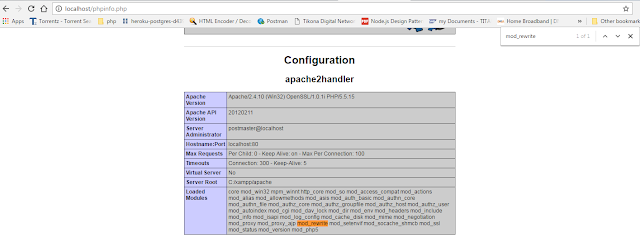
  1. Check mod_rewrite is enable or not: To check mod_rewrite is enable or not in xammp we have to write some php code for that purpose.
    <?php
    /**
    * to check which module is enable on server
    */
    echo phpinfo();
    ?>


    check in Loaded Modules or search for mod_rewrite in output. if you don't find mod_rewrite in loaded module in we have to enable that module.
  2. How to enable module: To activate the module, the following line in httpd.conf needs to be active:
    LoadModule rewrite_module modules/mod_rewrite.so


    enable mod_rewrite in xammp


    Remove hash form the that line and save that file after that restart your apache server and reload that page in browser. you will module is loaded in our xammp server.


You can watch video for how to enable mod_rewrite in xammp windows


Helpful links


How to export to excel in codeigniter 3

Leave a Comment
Today we gonna learn how to export to excel in codeigniter 3 without using any library. Download codeigniter and i already created test database. lets check our database


We are ready with our database lets start with controller i.e. ExportExcel.php
<?php
defined('BASEPATH') OR exit('No direct script access allowed');

class ExportExcel extends CI_Controller {

 function __construct()
 {
  parent::__construct();
  $this->load->database();
 }
 

 public function exportExcelData($records)
 {
  $heading = false;
        if (!empty($records))
            foreach ($records as $row) {
                if (!$heading) {
                    // display field/column names as a first row
                    echo implode("\t", array_keys($row)) . "\n";
                    $heading = true;
                }
                echo implode("\t", ($row)) . "\n";
            }
 }

 public function fetchDataFromTable()
 {
  $query =$this->db->get('one_piece_characters'); // fetch Data from table
  $allData = $query->result_array();  // this will return all data into array
  $dataToExports = [];
  foreach ($allData as $data) {
   $arrangeData['Charater Name'] = $data['name'];
   $arrangeData['Charater Profile'] = $data['profile'];
   $arrangeData['Charater Desc'] = $data['description'];
   $dataToExports[] = $arrangeData;
  }
  // set header
  $filename = "dataToExport.xls";
                header("Content-Type: application/vnd.ms-excel");
                header("Content-Disposition: attachment; filename=\"$filename\"");
  $this->exportExcelData($dataToExports);
 }
}

Now hit this url http://localhost/ci_tuts/index.php/ExportExcel/fetchDataFromTable. After hitting this url you will get your excel sheets.

Please comment down below if you have any query and please follows us for more awesome tutorials and keep motivating us .

Helper in codeigniter

Leave a Comment
Helpers, What is Helpers as the name suggests, help you with your work. Codeigniter helpers are do same thing. CodeIgniter has more than 20 helpers. Each helper file is simply a collection of functions in a particular category. Most of codeigniter helpers you use in your project. There are URL Helpers, that assist in creating links, there are Form Helpers that help you create form elements, Text Helpers perform various text formatting routines, Cookie Helpers set and read cookies, File Helpers help you deal with files, etc.

Unlike most of the other framework codeigniter helpers are not in OO(Object Oriented) format. Codeigniter helpers are simple, procedural functions. Each helper function performs one specific task, with no dependence on other functions.

Loading Helper in codeigniter at global level

Codeigniter not load helper file by by default. We have to load helper file name in config/autoload.php. After loading helper in atuoload.php file helper is globally available in your controller and views.
/*
| -------------------------------------------------------------------
|  Auto-load Helper Files
| -------------------------------------------------------------------
| Prototype:
|
| $autoload['helper'] = array('url', 'file');
*/

$autoload['helper'] = array('url','form');

Loading Helper in codeigniter at Controller level

Loading a helper file is quite simple using the following function:
$this->load->helper('name of your helper'); 
Where name is the file name of the helper, without the .php file extension or the "helper" part. For example, to load the URL Helper file, which is named url_helper.php, you would do this:
$this->load->helper('url');
You can load helper anywhere within your controller functions (or even within your View files, although that's not a good practice), as long as you load it before you use it. You can load your helpers in your controller constructor so that they become available automatically in any function, or you can load a helper in a specific function that needs it.
$this->load->helper( array('url', 'file', 'form') ); 
Using above method you can load multiple helper at one time, you can specify them in an array.

Send Email With Attachment Codeigniter

Leave a Comment
After Send email with codeigniter and Send email with codeigniter and smtp today we gonna look how to send email with attachment. Before we start i hope you know how to upload image in codeigniter. Because this tutorial is combination of the send email with codeigniter and upload image or attachment in folder. So let's start with controller i.e. Send_email.php
<?php if ( ! defined('BASEPATH')) exit('No direct script access allowed');

class Send_email extends CI_Controller {

 function __construct(){
    parent::__construct();
 }

 public function sendEmail()
 {
    if($this->input->post('send_email') == 'send_email'){
             $this->load->library('email');
             
              $config['upload_path'] = './uploads/';
              $config['allowed_types'] = 'gif|jpg|png';
              $config['max_size'] = '100000';
              $config['max_width']  = '1024';
              $config['max_height']  = '768';

             $this->load->library('upload', $config);
             $this->upload->do_upload('attachment');
             $upload_data = $this->upload->data();
             
             $this->email->attach($upload_data['full_path']);
             $this->email->set_newline("\r\n");
             $this->email->set_crlf("\r\n");
             $this->email->from('only4ututorials@gmail.com'); // change it to yours
             $this->email->to($this->input->post('email_id')); // change it to yours
             $this->email->subject($this->input->post('subject'));
             $this->email->message($this->input->post('body'));
             if ($this->email->send()) {
                 echo "Mail Send";
                 return true;
             } else {
                 show_error($this->email->print_debugger());
             }
    }else{
      $this->load->view('email_view');
    }
 }

}

Now lets start with view i.e. email_view.php
<!DOCTYPE html>
<html lang="en">
<head>
 <meta charset="utf-8">
 <title>Mass Email Example</title>
 <link rel="stylesheet" href="http://maxcdn.bootstrapcdn.com/bootstrap/3.3.5/css/bootstrap.min.css">
 <script src="//code.jquery.com/jquery-1.11.3.min.js"></script>
 <script src="http://maxcdn.bootstrapcdn.com/bootstrap/3.3.5/js/bootstrap.min.js"></script>
</head>
<body>
 <div class="container">
  <h1>Email Example With attchment</h1>
  <form action="<?php echo base_url()?>senddatabase_email/sendMassEmail" method="POST" enctype='multipart/form-data'>
    <div class="form-group">
      <label for="exampleInputEmail1">Enter Email</label>
      <input type="email" class="form-control" placeholder="Enter Email id" name="email_id"/>
    </div>
    <div class="form-group">
      <label for="exampleInputEmail1">Enter Subject</label>
      <input type="text" class="form-control" placeholder="Enter Email Subject" name="subject"/>
    </div>
    <div class="form-group">
      <label for="exampleInputPassword1">Body Content</label>
      <textarea class="form-control"  rows="3" placeholder="Enter Email Body Content" name="body"></textarea>
    </div>
    <div class="form-group">
      <label for="exampleInputFile">File input</label>
      <input type="file" id="exampleInputFile" name="attachment">
    </div>
    <button type="submit" name="send_email" value="send_email" class="btn btn-default">Submit</button>
  </form>
 </div>
</body>
</html> 

Send Email With Attachment Codeigniter


After filling all form when user click on submit function goes to sendEmail function which is written inside Send_email controller. To send attachment with email we use attach() function of email library.
$this->email->attach()

This above function enables you to send an attachment. Put the file path/name in the first parameter. Note: Use a file path, not a URL. For multiple attachments use the function multiple times. To pass file path we have to upload attachment in folder and make sure folder must be writable (666, or 777). After uploading attachment we get all uploaded data in $upload_data. $upload_data is array we need only full_path key value to do we have do something like this
$upload_data = $this->upload->data();
$this->email->attach($upload_data['full_path']);

After that we are ready to send email to user with attachment.

Please comment down below if you have any query and please follows us for more awesome tutorials and keep motivating us .

Ajax Pagination in Codeigniter

Leave a Comment
We already did normal Pagination With Codeigniter. If you don't know how pagination is work in codeigniter then please go through first that tutorials.

In previous tutorial we already created all needed file for our pagination so let's continue with those files. Below image was our file structure.

Ajax Pagination in Codeigniter


For ajax pagination let's update our controller file i.e. pagination.php
<?php if ( ! defined('BASEPATH')) exit('No direct script access allowed');

class Pagination extends CI_Controller {

 function __construct(){
  parent::__construct();
  $this->load->model('mdl_pagination');
  $this->load->library('table');
  $this->load->helper("url");
 }

 public function country($offset=null)
 {
  $this->load->library('pagination');

  $config['base_url'] = base_url().'pagination/country/';    // url of the page
  $config['total_rows'] = $this->mdl_pagination->countcountry(); //get total number of records 
  $config['per_page'] = 10;  // define how many records on page
  $config['full_tag_open'] = '<ul class="pagination" id="search_page_pagination">';
  $config['full_tag_close'] = '</ul>';
  $config['cur_tag_open'] = '<li class="active"><a href="javascript:void(0)">';
  $config['num_tag_open'] = '<li>';
  $config['num_tag_close'] = '</li>';
  $config['cur_tag_close'] = '</a></li>';
  $config['first_link'] = 'First';
  $config['first_tag_open'] = '<li>';
  $config['first_tag_close'] = '</li>';
  $config['last_link'] = 'Last';
  $config['last_tag_open'] = '<li>';
  $config['last_tag_close'] = '</li>';
  $config['next_link'] = FALSE;
  $config['next_tag_open'] = '<li>';
  $config['next_tag_close'] = '</li>';
  $config['prev_link'] = FALSE;
  $config['prev_tag_open'] = '<li>';
  $config['prev_tag_close'] = '</li>';
  $config['page_query_string'] = FALSE;

  $this->pagination->initialize($config);

  $data['country'] = $this->mdl_pagination->getcountries($config['per_page'],$offset);
  $this->load->view('pagination',$data);
 }

}

We just added few parameter in pagination config for some basic design. Now lets update our view file
<html>
<head>
 <link rel="stylesheet" href="http://maxcdn.bootstrapcdn.com/bootstrap/3.3.5/css/bootstrap.min.css">
 <script src="//code.jquery.com/jquery-1.11.3.min.js"></script>
 <script src="http://maxcdn.bootstrapcdn.com/bootstrap/3.3.5/js/bootstrap.min.js"></script>
</head>
<body>
 <div id="container">
  <h1>Countries</h1>
  <div id="body">
  <?php
   $this->table->set_heading('id', 'code', 'name');
   echo $this->table->generate($country);
   echo $this->pagination->create_links();
  ?>
  </div>
 </div>
   <script type="text/javascript">
   $(function(){
    $('body').on('click','ul#search_page_pagination>li>a',function(e){
      e.preventDefault();  // prevent default behaviour for anchor tag
      var Pagination_url = $(this).attr('href'); // getting href of <a> tag
     $.ajax({
      url:Pagination_url,
      type:'POST',
      success:function(data){
       var $page_data = $(data);
       $('#container').html($page_data.find('div#body'));
       $('table').addClass('table');
      }
     });
    });
   });
  </script>
</body>
</html>

this is our view file we don't need to change in modal file for this. Now you are wondering what's going on view file i will explain but first let's check how our view file look like.

Ajax Pagination in Codeigniter


Let's back to our code i hope you know jquery because we are using jquery with ajax. All magic goes with this below code.
<script type="text/javascript">
   $(function(){
    $('body').on('click','ul#search_page_pagination>li>a',function(e){
      e.preventDefault();  // prevent default behaviour for anchor tag
      var Pagination_url = $(this).attr('href'); // getting href of <a> tag
     $.ajax({
      url:Pagination_url,
      type:'POST',
      success:function(data){
       var $page_data = $(data);
       $('#container').html($page_data.find('div#body'));
       $('table').addClass('table');
      }
     });
    });
   });
  </script>

After document load if user click on one of the pagination link then we have to first remove default behaviour of anchor tag to remove that we use
e.preventDefault();
after that using "this" we got url of that clicked anchor tag after that call that url using ajax method. on success function of ajax we getting return data in "data params". We store that "data params" in jquery "$page_data". After that we have to find "div#body" from "$page_data" because all our pagination data in that div. After finding data we have to replace old data with new data in "#container" div. We will get next page data on our same page without refreshing page. The last line
$('table').addClass('table');
is just for design part. I am using same controller function for fist time load and ajax call you can separate both function and also i am loading same view for both call you can also separate both file then you don't need to write so much jquery in ajax success function you have just do something like this
success:function(data){
       $('#container').html(data));
       $('table').addClass('table');
      }

I did this all thing because to give you optimize code for ajax pagination in codeigniter.

Please comment down below if you have any query and please follows us for more awesome tutorials and keep motivating us .

Multiple file upload in codeigniter

Leave a Comment
Hello guy's, Today we gonna look how to upload Multiple file image with codeigniter. After single image upload with codeigniter. We gonna look multiple image upload in codeigniter. First we gonna look multi upload with same controller function after we move that function into helper so we can use somewhere else also. So let's start with controller file

Multi_upload.php (controller)

<?php if ( ! defined('BASEPATH')) exit('No direct script access allowed');

class Multi_upload extends CI_Controller {

 function __construct(){
  parent::__construct();
 }

 public function index()
 {
  $arrData['error'] = '';
  $arrData['content'] = 'multi_image_upload';
  $this->load->view('template',$arrData);
 }

 public function do_multi_upload(){
  if($this->input->post('submit_form')){
   if($_FILES["profile_pic"]["tmp_name"]) {
    $this->do_miltiupload_files('./uploads/', 'M', $_FILES['profile_pic']); // call the function with params
   }
  }
 }

 function do_miltiupload_files($path, $title, $files)
    {   
        $config = array(
            'upload_path'   => $path,
            'allowed_types' => 'jpg|gif|png',
            'overwrite'     => 1,                       
        );

        $this->load->library('upload', $config);

        $images = array();

        foreach ($files['name'] as $key => $image) {
            $_FILES['multi_images[]']['name']= $files['name'][$key];
            $_FILES['multi_images[]']['type']= $files['type'][$key];
            $_FILES['multi_images[]']['tmp_name']= $files['tmp_name'][$key];
            $_FILES['multi_images[]']['error']= $files['error'][$key];
            $_FILES['multi_images[]']['size']= $files['size'][$key];
            // here we change file name on run time
            $fileName = $title .'_'. $image;
            $images[] = $fileName;
            $config['file_name'] = $fileName; //new file name

            $this->upload->initialize($config); // load new config setting 

            if ($this->upload->do_upload('multi_images[]')) { // upload file here
             echo "<pre>";
                print_r($this->upload->data());
                // performs your operations
            } else {
                return false;
            }
        }
        return $images;
    }
}
After controller let's create view part
<html>
<head>
<title>Upload Form</title>
</head>
<body>

<?php echo form_open_multipart('multi_upload/do_multi_upload');?>
   <input type="file" name="profile_pic[]" size="20" multiple/>
   <br /><br />
   <input type="submit" value="upload" name="submit_form"/>
</form>

</body>
</html>
now you can hit url on your localhost and try to select multiple file and upload. You get your data and performs your database operations. After uploading image you get this screen
Multiple file upload in codeigniter

How to upload image in codeigniter

Leave a Comment
Hello guy's, Today we gonna look how to upload image with codeigniter. In this tutorial we will use CodeIgniter's File Uploading Class which help to upload file. Using this class we can also set various preferences, restricting the type and size of the files.

Creating the Upload Form i.e. image_upload.php (View)

<html>
<head>
<title>Upload Form</title>
</head>
<body>

<?php echo form_open_multipart('image_upload/do_upload');?>
<input type="file" name="profile_pic" size="20" />
<br /><br />
<input type="submit" value="upload" name="submit_form"/>
</form>
<?php if($error) { echo ($error['error']); }?>

</body>
</html>
You'll notice we are using a form helper to create the opening form tag. File uploads require a multipart form, so the helper creates the proper syntax for you. You'll also notice we have an $error variable. This is so we can show error messages in the event the user does something wrong.

image_upload.php (Controller)

Using a text editor, create a controller called image_upload.php. In it, place this code and save it to your applications/controllers/ folder:
<?php if ( ! defined('BASEPATH')) exit('No direct script access allowed');

class Image_upload extends CI_Controller {

function __construct(){
 parent::__construct();
        $this->load->helper(array('form', 'url'));
}

public function index()
{
 $arrData['error'] = '';
 $arrData['content'] = 'image_upload';
 $this->load->view('template',$arrData);
}

public function do_upload(){
 if($this->input->post('submit_form')){
  $config['upload_path'] = './uploads/';
  $config['allowed_types'] = 'gif|jpg|png';
  $config['max_size'] = '100';
  $config['max_width']  = '1024';
  $config['max_height']  = '768';

  $this->load->library('upload', $config);

  if ( ! $this->upload->do_upload('profile_pic'))
  {
                    $error = array('error' => $this->upload->display_errors());
   $arrData['error'] = $error;
   $arrData['content'] = 'image_upload';
   $this->load->view('template',$arrData);
  }
  else
  {
          $arrData['upload_data'] = $this->upload->data();
   $arrData['content'] = 'upload_success';
   $this->load->view('template',$arrData);
  }
 }
}
}
Now create uploads upload folder in root of your CodeIgniter installation and set its file permissions to 777.Now the last thing creating upload_success view

Creating upload Success view i.e upload_success.php (view)

<html>
<head>
<title>Upload Form</title>
</head>
<body>

<h3>Your file was successfully uploaded!</h3>
<ul>
<?php echo "<pre>"; print_r($upload_data); ?>
</ul>
<p><?php echo anchor('image_upload', 'Upload Another File!'); ?></p>
</body>
</html>
To try your form, visit your http://localhost/Proejct_foldername/image_upload. If you did't remove your index.php from url then you have to try with index.php in your url. Learn Here how to remove index.php from codeigniter Try uploading an image file (either a jpg, gif, or png). If the path in your controller is correct it should work. After successfully upload image you will get below output on upload_success page.
How to upload image in codeigniter

How to create a 404 page in CodeIgniter

Leave a Comment
This post is about creating a custom 404 page in CodeIgniter. There are so many reasons for having 404 page. Because you cannot avoid user typing incorrect URL pointing to a page on your domain which doesn't exists. Also there is some website can link to some url on website which no longer valid.

Codeigniter provides it's own 404 page which is ok. But we can create our own custom 404 page.CodeIgniter provides an easy way to build a custom 404 (Page-not-found) page. Here is the step by step on setting up a 404 page for your CodeIgniter website.

1. Create a new Controller


Create a new controller custom404.php. And Paste below code
<?php
class custom404 extends CI_Controller
{
    public function __construct()
    {
            parent::__construct();
    }

    public function index()
    {
        $this->data['content'] = 'custom404_view';  // View name
        $this->load->view('template', $data);   // load viwe
    }
}
?>
    

2. Create a view


Now create a view or your custom 404 page html design the way you like.

3. changes in routes.php


Now edit your routes.php which is present in application/config/routes.php. Change the following line in file
$route['404_override'] = 'custom404'; // Change your Controller name
    

Now try to put wrong url on browser you will get you custom 404 page.
Enjoy......:)

Deploy app on heroku

Leave a Comment

Deploying your first app on heroku

Follow this steps to deploying your first app on heroku

Step 1

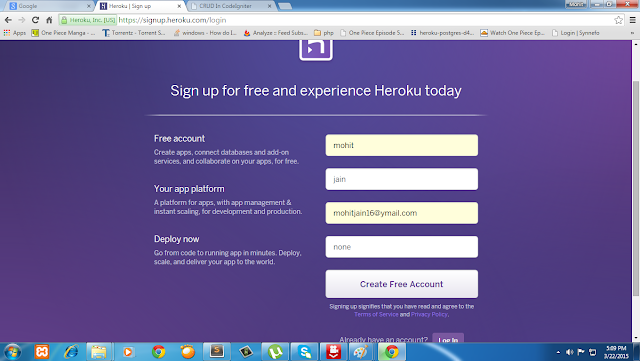
Creating account on heroku

step 1

Step 2

Confirm your account

step 2
After confirming your you will get screen to change your password

Step 3

Change you password

step 3


After that you will get welcome screen

step 4


Click on proceed you will get this screen

step 5


Step 4

Click on plus sign on right side of browser screen

step 6


After click on create app you will get this screen

step 7


Step 5

Download Heroku Toolbit & install heroku toolbit

step 8


step 9


Step 6

Go to your app which you have to deploy on heroku. Click mouse right side click you will get this menu. After click on git bash

step 10


step 11


Step 7

Create a new Git repository
Type some command to Initialize a git repository in a new or existing directory
$ git init
$ heroku login


login with your heroku credentials After that type

$ git remote -v
if your get any remote connection then remove that connection and add new remote connection

$ heroku git:remote -a name_of_your_app
you will get success message. After that again run $ git remote -v

step 12


Step 8

Deploy your application
After to all this step your app is setup. Now Commit your code to the repository and deploy it to Heroku using Git.
$ git add 
$ git commit -am "write your comment"
$ git push heroku master


step 13

CodeIgniter From Scratch: Day 1

Leave a Comment

CodeIgniter From Scratch: Day 1

Over the course of about 10 videos, Jeffrey Way will teach you exactly how to use this framework. Ultimately, we'll work our way up to building a custom CMS. Without further ado, here's day one!


How to do form validation in codeigniter

Leave a Comment

Form validation in CodeIgniter using its form validation library

Before explaining CodeIgniter's approach to data validation, let's describe the ideal scenario:
  1. A form is displayed. 
  2. You fill it in and submit it. 
  3. If you submitted something invalid, or perhaps missed a required item, the form is redisplayed containing your data along with an error message describing the problem. 
  4. This process continues until you have submitted a valid form.
In order to implement form validation you'll need three things:
  1. A View file containing a form.
  2. A View file containing a "success" message to be displayed upon successful submission.
  3. A controller function to receive and process the submitted data.
let's start with controller i.e. form_validation.php.


<?php if ( ! defined('BASEPATH')) exit('No direct script access allowed');

class form_validation extends CI_Controller {
 
 function __construct()
 {
  parent::__construct();
  $this->load->library('form_validation');
$this->load->helper('form');
 }

 function index()
 {
  $this->load->view('form_validation');
 }

 function check_validation()
 {
  $this->form_validation->set_rules('name', 'Name', 'trim|required|min_length[5]|xss_clean');
  $this->form_validation->set_rules('email', 'Email', 'trim|required|valid_email|xss_clean');
  $this->form_validation->set_rules('password', 'Password', 'trim|required|min_length[5]|xss_clean|matches[cpassword]');
  $this->form_validation->set_rules('cpassword', 'Confrim password', 'trim|required|min_length[5]|xss_clean');
  $this->form_validation->set_rules('website_url', 'Url', 'trim|required|xss_clean');
  
  if($this->form_validation->run()==true){
   print_r($this->input->post());
  }else{
   $this->load->view('form_validation');
  }
 }
}
Now lets create view file form_validation.php.

<!DOCTYPE html>
<html lang="en">
<head>
 <meta charset="utf-8">
 <title>Form Validation In CodeIgniter</title>
 <style type="text/css">
 .warpper{
  width: 100%;
 }
 .warpper table{
  margin: 50px auto;
  text-align: center;
 }
 h1{
  text-align: center;
 }
 </style>
</head>
<body>
 <div class="warpper">
  <h1>Form Validation In CodeIgniter</h1>
  <?php echo form_open('form_validation/check_validation');?>
   <table border=1 cellpadding=5 cellspaceing=5>
    <tr>
     <td>Name</td>
     <td>
      <?php echo form_input('name');?>
      <?php echo form_error('name');  ?>
     </td>
    </tr>
    <tr>
     <td>Email Id</td>
     <td>
      <?php echo form_input('email');?>
      <?php echo form_error('email');  ?>
     </td>
    </tr>
    <tr><td>Password</td>
     <td>
      <?php echo form_password('password');?>
      <?php echo form_error('password');  ?>
     </td>
    </tr>
    <tr><td>Confrim password</td>
     <td>
      <?php echo form_password('cpassword');?>
      <?php echo form_error('cpassword');  ?>
     </td>
    </tr>
    <tr><td>website url</td>
     <td>
      <?php echo form_input('website_url');?>
      <?php echo form_error('website_url');  ?>
     </td>
    </tr>
    <tr colspan="2"><td><input type="submit"/></td></tr>
   </table>
  <?php echo  form_close();?>
 </div>
</body>
</html>


Explanation

The form (form_validation.php) is a standard web form with a couple exceptions:
  1. It uses a form helper to create the form opening. Technically, this isn't necessary. You could create the form using standard HTML. However, the benefit of using the helper is that it generates the action URL for you, based on the URL in your config file. This makes your application more portable in the event your URLs change.
  2. Controller has one function: construct() This function initializes the validation class and loads the form helper and load the form_validation library.
  3. Index(): This function loads view file.
  4. Run this code in using http://localhost/ci/form_validation/. You will get below screen.
  5. Now submit the form with the fields blank and you should see the error messages. If you submit the form with all the fields populated you'll see your success page.
  6. Form submitted on the check_validation function this function check various validation rules.If validation is true then i will print all post data else it will return to form will error massage.


Set Validation rules:

CodeIgniter lets you set as many validation rules as you need for a given field, cascading them in order, and it even lets you prep and pre-process the field data at the same time. To set validation rules you will use the set_rules() function:

$this->form_validation->set_rules();


The above function takes three parameters as input:

  1. The field name - the exact name you've given the form field.
  2. A "human" name for this field, which will be inserted into the error message. For example, if your field is named "user" you might give it a human name of "Username". Note: If you would like the field name to be stored in a language file.
  3. The validation rules for this form field.

Some validation rules are here.
  • trim : This remove space from string both side(left and right).
  • required : Fields are compulsory.
  • min_length : Minimum length of the field is 5 character.
  • xss_clean : This removes malicious data.
  • valid_email : This will check user enter valid email or not.
  • matches : This will match one value to anotoher.
For more validation rule visit this link.   After all this if you submit your form then it will look like this


It's not look well so let's do some css to validation error.Modify check_validation function

function check_validation()
 {
  $this->form_validation->set_rules('name', 'Name', 'trim|required|min_length[5]|xss_clean');
  $this->form_validation->set_rules('email', 'Email', 'trim|required|valid_email|xss_clean');
  $this->form_validation->set_rules('password', 'Password', 'trim|required|min_length[5]|xss_clean|matches[cpassword]');
  $this->form_validation->set_rules('cpassword', 'Confrim password', 'trim|required|min_length[5]|xss_clean');
  $this->form_validation->set_rules('website_url', 'Url', 'trim|required|xss_clean');
  $this->form_validation->set_error_delimiters('<div class="error">', '</div>'); // added new line
  if($this->form_validation->run()==true){
   print_r($this->input->post());
  }else{
   $this->load->view('form_validation');
  }
 }

Modify view file also add some css to file
<style type="text/css">
 .warpper{
  width: 100%;
 }
 .warpper table{
  margin: 50px auto;
  text-align: center;
 }
 h1{
  text-align: center;
 }
 .error{
  color: red;
 }
 </style>

After that if you submit the form then you will get screen like this screenshot.

Now its look little bit nice.If you inspect element those error then you get <div> with class error.

Changing the Error Delimiters: By default, the Form Validation class adds a paragraph tag (<p>) around each error message shown. You can either change these delimiters globally or individually.

  1. Changing delimiters Globally

    To globally change the error delimiters, in your controller function, just after loading the Form Validation class, add this:
    $this->form_validation->set_error_delimiters('<div class="error">', '</div>');
    

    In this example, we've switched to using div tags.
  2. Changing delimiters Individually

    If you want to change error delimiter individually then you do this in view file when you write your form_error().
    <?php echo form_error('field name', '<div class="error">', '</div>'); ?>


    or

    from_error is used to show error individually.If you want to show all error at one place then you can use validation_errors().
    <?php echo validation_errors('<div class="error">', '</div>'); ?>
    

    If you want to use validation_errors() then you have to change your view file like this.

    <!DOCTYPE html>
    <html lang="en">
    <head>
     <meta charset="utf-8">
     <title>Form Validation In CodeIgniter</title>
     <style type="text/css">
     .warpper{
      width: 100%;
     }
     .warpper table{
      margin: 50px auto;
      text-align: center;
     }
     h1{
      text-align: center;
     }
     .error{
      color: red;
     }
     </style>
    </head>
    <body>
     <div class="warpper">
      <h1>Form Validation In CodeIgniter</h1>
      <?php echo form_open('form_validation/check_validation');?>
       <table border=1 cellpadding=5 cellspaceing=5>
        <tr>
         <td></td>
         <td>
          <?php echo validation_errors(); ?>
         </td>
        </tr>
        <tr>
         <td>Name</td>
         <td>
          <?php echo form_input('name');?>
         </td>
        </tr>
        <tr>
         <td>Email Id</td>
         <td>
          <?php echo form_input('email');?>
         </td>
        </tr>
        <tr><td>Password</td>
         <td>
          <?php echo form_password('password');?>
         </td>
        </tr>
        <tr><td>Confrim password</td>
         <td>
          <?php echo form_password('cpassword');?>
         </td>
        </tr>
        <tr><td>website url</td>
         <td>
          <?php echo form_input('website_url');?>
         </td>
        </tr>
        <tr colspan="2"><td><input type="submit"/></td></tr>
       </table>
      <?php echo  form_close();?>
     </div>
    </body>
    </html>
    
    
    After changing the view file if you submit form then it's show error like below image.

    error
If you submit your form using this value.

error


And submit form then it will accept all value and it's shows output like this :

error


but if you check that website url is wrong but it's accepted that value then how to handle this type of situation.No worries to handle this type of situation codeigniter introduce it's callback method.

Callbacks: Your own Validation Functions
The validation system supports callbacks to your own validation functions. This permits you to extend the validation class to meet your needs. For example, here we need to handle website url.so we modify the check_validation function.
function check_validation()
 {
  $this->form_validation->set_rules('name', 'Name', 'trim|required|min_length[5]|xss_clean');
  $this->form_validation->set_rules('email', 'Email', 'trim|required|valid_email|xss_clean');
  $this->form_validation->set_rules('password', 'Password', 'trim|required|min_length[5]|xss_clean|matches[cpassword]');
  $this->form_validation->set_rules('cpassword', 'Confrim password', 'trim|required|min_length[5]|xss_clean');
  $this->form_validation->set_rules('website_url', 'Url', 'trim|required|xss_clean|callback_checkwebsiteurl'); //modify this line
  $this->form_validation->set_error_delimiters('<div class="error">', '</div>');
  if($this->form_validation->run()==true){
   echo "<pre>";
   print_r($this->input->post());
  }else{
   $this->load->view('form_validation');
  }
 }
Add new function in your controller file i.e form_validation.php
function checkwebsiteurl($string_url)
 {
        $reg_exp = "@^(http\:\/\/|https\:\/\/)?([a-z0-9][a-z0-9\-]*\.)+[a-z0-9][a-z0-9\-]*$@i";
        if(preg_match($reg_exp, $string_url) == TRUE){
         return TRUE;
        }
        else{
         $this->form_validation->set_message('checkwebsiteurl', 'URL is invalid format');
         return FALSE;
        }
 }

Reload your form and submit it with url mohit jain.You can see that the form field data was passed to your callback function for you to process.
To invoke a callback just put the function name in a rule, with "callback_" as the rule prefix. If you need to receive an extra parameter in your callback function, just add it normally after the function name between square brackets, as in: "callback_foo[bar]", then it will be passed as the second argument of your callback function.
Note: You can also process the form data that is passed to your callback and return it. If your callback returns anything other than a boolean TRUE/FALSE it is assumed that the data is your newly processed form data.

Setting Error Messages


All of the native error messages are located in the following language file: language/english/form_validation_lang.php.
To set your own custom message you can either edit that file, or use the following function:

$this->form_validation->set_message('rule', 'Error Message');

Where rule corresponds to the name of a particular rule, and Error Message is the text you would like displayed.
If you include %s in your error string, it will be replaced with the "human" name you used for your field when you set your rules.
In the "callback" example above, the error message was set by passing the name of the function:
$this->form_validation->set_message('checkwebsiteurl', 'URL is invalid format');


Re-populating the form


Thus far we have only been dealing with errors. It's time to repopulate the form field with the submitted data. CodeIgniter offers several helper functions that permit you to do this.We need to change our view file to implement this function
<!DOCTYPE html>
<html lang="en">
<head>
 <meta charset="utf-8">
 <title>Form Validation In CodeIgniter</title>
 <style type="text/css">
 .warpper{
  width: 100%;
 }
 .warpper table{
  margin: 50px auto;
  text-align: center;
 }
 h1{
  text-align: center;
 }
 .error{
  color: red;
 }
 </style>
</head>
<body>
 <div class="warpper">
  <h1>Form Validation In CodeIgniter</h1>
  <?php echo form_open('form_validation/check_validation');?>
   <table border=1 cellpadding=5 cellspaceing=5>
    <tr>
     <td>Name</td>
     <td>
      <?php echo form_input('name',set_value('name'));?>
      <?php echo form_error('name');  ?>
     </td>
    </tr>
    <tr>
     <td>Email Id</td>
     <td>
      <?php echo form_input('email',set_value('email'));?>
      <?php echo form_error('email');  ?>
     </td>
    </tr>
    <tr><td>Password</td>
     <td>
      <?php echo form_password('password',set_value('password'));?>
      <?php echo form_error('password');  ?>
     </td>
    </tr>
    <tr><td>Confrim password</td>
     <td>
      <?php echo form_password('cpassword',set_value('cpassword'));?>
      <?php echo form_error('cpassword');  ?>
     </td>
    </tr>
    <tr><td>website url</td>
     <td>
      <?php echo form_input('website_url',set_value('website_url'));?>
      <?php echo form_error('website_url');  ?>
     </td>
    </tr>
    <tr colspan="2"><td><input type="submit"/></td></tr>
   </table>
  <?php echo  form_close();?>
 </div>
</body>
</html>

Now reload your page and submit the form so that it triggers an error. Your form fields should now be re-populated.
We use set_value('field name') to re-populating the form.If we enter only website url wrong and submit then its look like this screenshot.All value are automatically re-populating the form.


Helpful links


Please comment down below if you have any query and please follows us for more awesome tutorials and keep motivating us .

How to set cookie in codeigniter

Leave a Comment

Cookies in codeigniter


To use cookies in codeigniter we have to use its helper class.The Cookie Helper file contains functions that assist in working with cookies.
Below is the example to set cookies in get its values.So we create controller cookies_demo.php.Add the some method like the below example:
<?php if ( ! defined('BASEPATH')) exit('No direct script access allowed');

class cookies_demo extends CI_Controller {
 
 function __construct()
 {
  parent::__construct();
  $this->load->helper('cookie');
 }
 // to set cookies 
 function set()
 {
  $cookie= array(
      'name'   => 'demo',
      'value'  => 'Hello i m cookies which saved in this broswer',
       'expire' => '86500',
  );
  $this->input->set_cookie($cookie);
  echo "cookies successfully set";
 }
 // to get cookies
 function get()
 {
  echo $this->input->cookie('demo',true);
 }
}


Loading this Helper
This helper is loaded using the following code:
$this->load->helper('cookie');


The following functions are available:

$this->input->set_cookie()

Sets a cookie containing the values you specify. There are two ways to pass information to this function so that a cookie can be set: Array Method, and Discrete Parameters:

Array Method


Using this method, an associative array is passed to the first parameter:
$cookie = array(
    'name'   => 'demo',
      'value'  => 'Hello i m cookies which saved in this broswer',
       'expire' => '86500',
    'domain' => '.only4ututorials.blogspot.com',
    'path'   => '/',
    'prefix' => 'myprefix_',
    'secure' => TRUE
);

$this->input->set_cookie($cookie);


Notes:

  • Only the name and value are required. To delete a cookie set it with the expiration blank.
  • The expiration is set in seconds, which will be added to the current time. Do not include the time, but rather only the number of seconds from now that you wish the cookie to be valid. If the expiration is set to zero the cookie will only last as long as the browser is open.
  • For site-wide cookies regardless of how your site is requested, add your URL to the domain starting with a period, like this: .your-domain.com
  • The path is usually not needed since the function sets a root path.
  • The prefix is only needed if you need to avoid name collisions with other identically named cookies for your server.
  • The secure boolean is only needed if you want to make it a secure cookie by setting it to TRUE.
If after all this your cookies not set.Then check belows Points.

  • If you set 'secure' => TRUE.  which is only for https.
  • Always try to set 'expire' => 'something'.


Discrete Parameters
If you prefer, you can set the cookie by passing data using individual parameters:
$this->input->set_cookie($name, $value, $expire, $domain, $path, $prefix, $secure);


$this->input->cookie()
Lets you fetch a cookie. The first parameter will contain the name of the cookie you are looking for (including any prefixes):
$this->input->cookie('demo',true);

The function returns FALSE (boolean) if the item you are attempting to retrieve does not exist. The second optional parameter lets you run the data through the XSS filter. It's enabled by setting the second parameter to boolean TRUE;


Helpful links


Please comment down below if you have any query and please follows us for more awesome tutorials and keep motivating us .

CodeIgniter From Scratch : Select records from database

Leave a Comment

Select records from database for CodeIgniter CRUD


In previous tutorials we learn how to set up out project directory for codeigniter crud.In this we learn how to fetch data from database using MVC of codegniter.
Let's go to our controller i.e. data.php and add some stuff to make CRUD work. Add the some method like the below example:


<?php if ( ! defined('BASEPATH')) exit('No direct script access allowed');

class data extends CI_Controller {
 
 function __construct()
 {
  parent::__construct();
  //load the  model
  $this->load->model('mdl_data');
 }
 // load the view and fetch data from out model function
 public function index()
 {
  $arrData['users'] = $this->mdl_data->getall(); //call the mdl_data getall function to getall data
  $this->load->view('show',$arrData); // pass all data to view
 }
}


Now let's create out model file which place inside application/model/ name as mdl_data.php
<?php if ( ! defined('BASEPATH')) exit('No direct script access allowed');

class Mdl_data extends CI_Model {

 function __construct()
 {
  parent::__construct();
 }
 
 function getall(){
  $query =$this->db->get('users'); //users is the table name
  if($query->num_rows()>0){
   return $query->result_array();  // this will return all data into array
  }
 }
}
Now let's create our view The results that we have seen we can use them to have Codeigniter CRUD. We just need a view to do it. So a view will look like this:
<!DOCTYPE html>
<html lang="en">
<head>
 <meta charset="utf-8">
 <title>CRUD In CodeIgniter</title>
 <style type="text/css">
 .warpper{
  width: 100%;
 }
 .warpper table{
  margin: 50px auto;
  text-align: center;
 }
 .warpper p{
  margin: 50px auto;
 }
 h1{
  text-align: center;
 }
 </style>
</head>
<body>
 <div class="warpper">
  <h1>CRUD In CI</h1>
  <?php if($this->session->flashdata('success')){ ?> 
   <p style="color:green"><?php echo $this->session->flashdata('success'); ?></p>
  <?php } ?>
  <table border=1 cellpadding=5 cellspaceing=5>
   <tr colspan="6"><td><a href="<?php echo base_url()."data/add/"; ?>">Add New Record</a></td></tr>
   <tr>
    <th>Id</th>
    <th>Name</th>
    <th>Email Id</th>
    <th>Edit</th>
    <th>Delete</th>
   </tr>
   <?php if($users) { foreach ($users as $user) { ?>
   <tr>
    <td><?php echo $user['id']; ?></td>
    <td><?php echo $user['name']; ?></td>
    <td><?php echo $user['email_id']; ?></td>
    <th><a href="<?php echo base_url()."data/edit/".$user['id']; ?>">Edit</a></th>
    <th><a href="<?php echo base_url()."data/delete/".$user['id']; ?>">Delete</a></th>
   </tr>
   <?php } } ?>
  </table>
 </div>
</body>
</html>


After doing all this run the code like this http://localhost/crud/data/.So a it will look like this:


CodeIgniter From Scratch : Directory Setup for CRUD

Leave a Comment

Directory Setup And Database Setup For CodeIgniter CRUD.


Step 1: Download Codeigniter and check this Link to set up codeigniter
After Proper Setup Your Page get look like this as seen below


Step 2: Now we are ready to configure our database for our codeigniter project.To do that goto your codeigniter /appication/config/database.php.Open that file in your editor it will look like this.
<?php  if ( ! defined('BASEPATH')) exit('No direct script access allowed');
/*
| -------------------------------------------------------------------
| DATABASE CONNECTIVITY SETTINGS
| -------------------------------------------------------------------
| This file will contain the settings needed to access your database.
|
| For complete instructions please consult the 'Database Connection'
| page of the User Guide.
|
| -------------------------------------------------------------------
| EXPLANATION OF VARIABLES
| -------------------------------------------------------------------
|
| ['hostname'] The hostname of your database server.
| ['username'] The username used to connect to the database
| ['password'] The password used to connect to the database
| ['database'] The name of the database you want to connect to
| ['dbdriver'] The database type. ie: mysql.  Currently supported:
     mysql, mysqli, postgre, odbc, mssql, sqlite, oci8
| ['dbprefix'] You can add an optional prefix, which will be added
|     to the table name when using the  Active Record class
| ['pconnect'] TRUE/FALSE - Whether to use a persistent connection
| ['db_debug'] TRUE/FALSE - Whether database errors should be displayed.
| ['cache_on'] TRUE/FALSE - Enables/disables query caching
| ['cachedir'] The path to the folder where cache files should be stored
| ['char_set'] The character set used in communicating with the database
| ['dbcollat'] The character collation used in communicating with the database
|     NOTE: For MySQL and MySQLi databases, this setting is only used
|      as a backup if your server is running PHP < 5.2.3 or MySQL < 5.0.7
|     (and in table creation queries made with DB Forge).
|      There is an incompatibility in PHP with mysql_real_escape_string() which
|      can make your site vulnerable to SQL injection if you are using a
|      multi-byte character set and are running versions lower than these.
|      Sites using Latin-1 or UTF-8 database character set and collation are unaffected.
| ['swap_pre'] A default table prefix that should be swapped with the dbprefix
| ['autoinit'] Whether or not to automatically initialize the database.
| ['stricton'] TRUE/FALSE - forces 'Strict Mode' connections
|       - good for ensuring strict SQL while developing
|
| The $active_group variable lets you choose which connection group to
| make active.  By default there is only one group (the 'default' group).
|
| The $active_record variables lets you determine whether or not to load
| the active record class
*/

$active_group = 'default';
$active_record = TRUE;

$db['default']['hostname'] = 'localhost';
$db['default']['username'] = '';
$db['default']['password'] = '';
$db['default']['database'] = '';
$db['default']['dbdriver'] = 'mysql';
$db['default']['dbprefix'] = '';
$db['default']['pconnect'] = TRUE;
$db['default']['db_debug'] = TRUE;
$db['default']['cache_on'] = FALSE;
$db['default']['cachedir'] = '';
$db['default']['char_set'] = 'utf8';
$db['default']['dbcollat'] = 'utf8_general_ci';
$db['default']['swap_pre'] = '';
$db['default']['autoinit'] = TRUE;
$db['default']['stricton'] = FALSE;


/* End of file database.php */
/* Location: ./application/config/database.php */


you have change some filed i.e
$db['default']['hostname'] = 'localhost';  // change it with your host name
$db['default']['username'] = 'root';       // change it with your username
$db['default']['password'] = 'root';       // change it with your password
$db['default']['database'] = 'crud_database'; // change it with your DB name
$db['default']['dbdriver'] = 'mysql';                   


After that goto your mysql server phpmyadmin create a new database using this query
Create Database crud_database;     // change it with your database name


Create your table in your database. Let's say we have the table with table name users. The SQL code that you can insert is:
CREATE TABLE IF NOT EXISTS `users` (
  `id` int(11) NOT NULL AUTO_INCREMENT,
  `name` varchar(255) NOT NULL,
  `email_id` varchar(255) NOT NULL,
  PRIMARY KEY (`id`)
) ENGINE=InnoDB  DEFAULT CHARSET=latin1 AUTO_INCREMENT=3 ;

--
-- Dumping data for table `users`
--

INSERT INTO `users` (`id`, `name`, `email_id`) VALUES
(1, 'mohit jain', 'mohitj475@gmai.com');
Let's go to the next step.

Step 3: Setup directory for the our CodeIgniter CRUD.

Step 4: Open the autoload.php file i.e. in application/config/autoload.php.

/*
| -------------------------------------------------------------------
|  Auto-load Libraries
| -------------------------------------------------------------------
| These are the classes located in the system/libraries folder
| or in your application/libraries folder.
|
| Prototype:
|
|	$autoload['libraries'] = array('database', 'session', 'xmlrpc');
*/

$autoload['libraries'] = array('database','session');


/*
| -------------------------------------------------------------------
|  Auto-load Helper Files
| -------------------------------------------------------------------
| Prototype:
|
|	$autoload['helper'] = array('url', 'file');
*/

$autoload['helper'] = array('url');


Autoload the our libraries and helper which we use in this Codeigniter crud.

How to send mail using CodeIgniter and smtp

Leave a Comment

Send mail using codeIgniter and smtp


Sending email is not only simple, but you can configure it on the fly or set your preferences in a config file.In the past, I have used the email helper extensively in combination with sendmail, however for a new project I was required to route e-mail through a third-party SMTP server, in this case Gmail. I used the following code:
 function sendMail()
 {
     $config = Array(
    'protocol' => 'smtp',
    'smtp_host' => 'ssl://smtp.googlemail.com',
    'smtp_port' => 465,
    'smtp_user' => 'xxx@gmail.com', // change it to yours
    'smtp_pass' => 'xxx', // change it to yours
    'mailtype' => 'html',
    'charset' => 'iso-8859-1',
    'wordwrap' => TRUE
  );

       $message = '';
       $this->load->library('email', $config);
       $this->email->set_newline("\r\n");  
       $this->email->from('xxx@gmail.com'); // change it to yours
       $this->email->to('xxx@gmail.com');// change it to yours
       $this->email->subject('CodeIgniter and smtp');
       $this->email->message('send mail using CodeIgniter and smtp');
     if($this->email->send())
     {
       echo 'Email sent.';
     }
     else
     {
      show_error($this->email->print_debugger());
     }

 }


Helpful links


How to send mail using CodeIgniter.

Leave a Comment

Send E-mail using codeIgniter.


Sending email is not only simple, but you can configure it on the fly or set your preferences in a config file. CodeIgniter's Email Class supports the following features:

  • Multiple Protocols: 
  • Mail, Sendmail, and SMTP Multiple recipients 
  • CC and BCCs 
  • HTML or Plaintext email 
  • Attachments 
  • Word wrapping 
  • Priorities 
  • BCC Batch Mode, enabling large email lists to be broken into small BCC batches. 
  • Email Debugging tools
Here is a basic example demonstrating how you might send HTML email.
So let's start with controller.

Controller Name : email.php

<?php if ( ! defined('BASEPATH')) exit('No direct script access allowed');

class Email extends CI_Controller {
 
 function __construct(){

  parent::__construct();
  //load the  library
  $this->load->library('email');
 }

 function send_mail(){
 
  $this->email->from('mohitj475@gmail.com', 'Mohit');
  $this->email->to('mohitj475@gmail.com');
  
  $this->email->subject('mail send demonstration');
  $this->email->message('this is testing');
  
  $this->email->send();
  
  echo $this->email->print_debugger();
 }
}


If you run above code then you will get output like this


Explanation : In controller's constructor method first we load email library so we can use library function.After that we created send_mail function in to we use library function.

Email Function Reference


$this->email->from()

Sets the email address and name of the person sending the email:
$this->email->from('mohitj475@gmail.com', 'Mohit');
$this->email->to()

Sets the email address(s) of the recipient(s). Can be a single email, a comma-delimited list or an array:
$this->email->to('mohitj475@gmail.com');
$this->email->to('one@example.com, two@example.com, three@example.com');
$list = array('one@example.com', 'two@example.com', 'three@example.com');

$this->email->to($list);
$this->email->subject()

Sets the email subject:
$this->email->subject('mail send demonstration');
$this->email->message()

Sets the email message body:
 $this->email->message('this is testing');
$this->email->send()

The Email sending function. Returns boolean TRUE or FALSE based on success or failure, enabling it to be used conditionally:
if ( ! $this->email->send())
{
    // Generate error
}
For function more Visit this link


Helpful links


CodeIgniter From Scratch : CRUD

Leave a Comment

Basic CRUD With Codeigniter


If you are totally new to the codeigniter experience and you can't still understand the way that you can create a CRUD, this codeigniter CRUD tutorial is just for you.We'll review how to easily create, read, update, and delete records using CI's active-records class.

So, We will do it this process in 4 stage

Stage 1 : In this stage we will setup a directory and database.

Stage 2 : In this stage we will Select all database from the database and show into the view.

Stage 3 : In this stage we will Edit and Update Data from the database

Stage 4 : In this stage we will see how to delete data from the database

let's start with Stage 1

How to Setup CodeIgniter on local xampp server with screenshots

Leave a Comment

Codelgniter install Step By Step Tutorial for beginners:

What is CodeIgniter?

CodeIgniter is a powerful PHP framework with a very small footprint, built for PHP coders who need a simple and elegant toolkit to create full-featured web applications. If you're a developer who lives in the real world of shared hosting accounts and clients with deadlines, and if you're tired of ponderously large and thoroughly undocumented frameworks, then CodeIgniter might be a good fit.

How To install CodeIgniter?

In our local server with step by step with screenshots.

Step 1 : Download codeIgniter from Here

Step 2 : After downloaded codelgniter extract in your server root directory i.e. your htdocs folder

Step 3 : After that rename that folder into your project name In my case its folder name is CI you can rename whatever you want

Step 4 : After that open your browser and run http://localhost/CI/

Your Page get look like this as seen below


And here you done your codelgniter is finally setup Now you start with its coding...enjoy...


Helpful links


How To Create Captcha With Codeigniter

Leave a Comment
In this tutorial I will show you how to use the the codeigniter captcha helper.

The CAPTCHA Helper file contains functions that assist in creating CAPTCHA images.

Frist we have load library of captcha in controller.

$this->load->helper('captcha');
Now we will create controller for the CAPTCHA so let's start.Before we create controller we will create captcha folder in root directory of project.


<?php
/**
* 
*/
class Captcha extends CI_Controller
{
 
 function __construct()
 {
  parent::__construct();
  $this->load->helper('captcha');
  $this->load->helper('url');
 }

 function index()
 {
  $vals = array(
      'img_path'  => './captcha/',
     'img_url'  => base_url().'/captcha/',
     'img_width' => 150,
     'img_height' => '50',
     'expiration' => 7200
     );

 $cap = create_captcha($vals);
 print_r($cap['word']);
 echo $cap['image'];
 }
}

?>
EXPLANATION : 1) In construct method of the controller we load captcha library for the captcha and url library for the base_url()
2) In Index method we create array of captcha.
3) Only the img_path and img_url are required.Other are optional.
4) The "captcha" folder must be writable (666, or 777).
5) The "expiration" (in seconds) signifies how long an image will remain in the captcha folder before it will be deleted. The default is two hours.
So that's it we create captcha for us.Our captcha look like this.


print_r($cap['word']); will print the word which is in captcha image we can use this word for the checking user is enter wrong value or right.

echo $cap['image']; will for the image which is shown as captcha.
If we look in captcha folder the image is store in that folder.


Helpful links


Powered by Blogger.